


Table of Contents:
- Introduction to Time Pickers in Mobile UX.
- Importance of Time Picker Design.
- Evolution of Time Pickers.
- Material You and Time Picker Redesigns.
- Challenges in 24-Hour Time Picker Design.
- Best Practices for Time Picker Design.
- Conclusion.
Time pickers serve as vital components in mobile applications, allowing users to effortlessly set times for alarms, calendar events, and reminders. With mobile interface expectations rising, modern timepicker solutions have become key to optimizing user satisfaction and minimizing interaction friction. An innovative and thoughtfully designed time picker not only streamlines task completion but also supports accessibility for broader user groups.
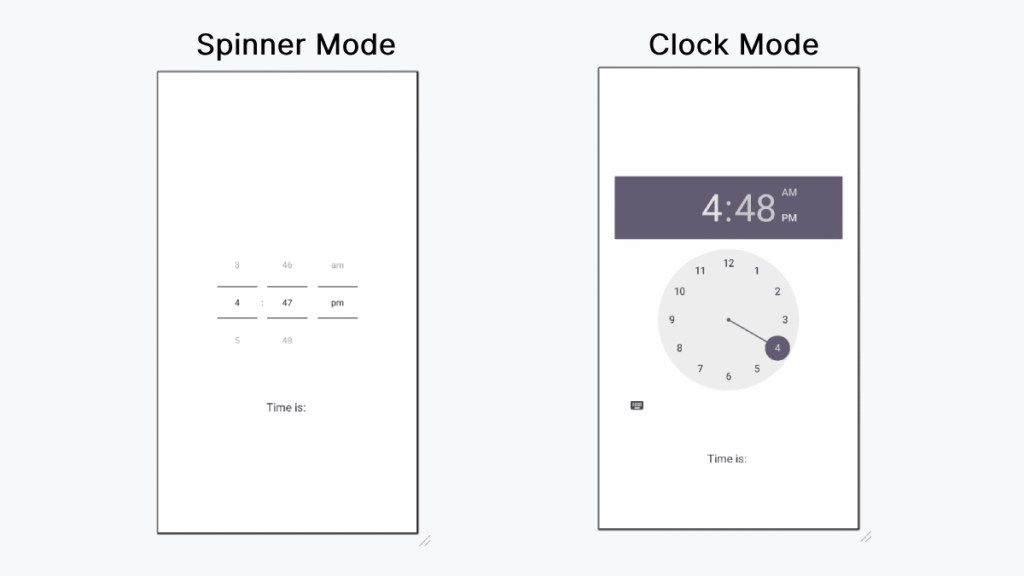
Early time pickers in mobile UIs were simple but were often the source of user frustration, especially when the interface was unintuitive. As mobile devices have advanced, so too have the design philosophies behind these essential controls. Designers and developers now focus on refining time picker experiences by prioritizing clarity and user-friendliness at every step.
Today’s most effective time pickers build on decades of usability research, branching beyond mere functionality. They combine familiar interaction patterns with modern touches, offering a seamless experience that respects varied accessibility needs and device form factors. Designing with empathy ensures interfaces can meet users’ differing requirements, further improving the daily usability of mobile devices.
With these user-centric priorities in mind, let us dig into the evolving landscape of time picker innovation, exploring how major platforms like iOS and Android have adapted, and which best practices designers can adopt for the future. For additional context on time picker trends and solutions, refer to this comprehensive overview by Smashing Magazine: Designing Date And Time Pickers For Mobile UX.
Importance of Time Picker Design.
The effectiveness of a time picker can influence the overall perception of an application. A user-friendly design enables quick and accurate time selection, reducing cognitive load and avoiding potential frustration. According to a usability study by the Nielsen Norman Group, a straightforward picker is especially critical for apps with frequent time-based interactions. Interfaces that foster confidence and reduce errors are particularly valued by users, making robust time picker design a competitive necessity for mobile apps across industries.
Evolution of Time Pickers.
In the early days of mobile apps, time pickers usually consisted of dropdown menus or basic input fields. These simplistic methods were often imprecise, made errors likely, and could feel clunky on touchscreens. The rise of smartphones led to more tactile and visually engaging mechanisms. For example, Apple’s iOS 15 revived the iconic wheel-style picker, combining nostalgia and enhanced usability with the efficiency of gesture-based input. Such evolutions underline a trend toward intuitive controls that support both speed and accuracy in time selection tasks. For more, see this detailed analysis by iDownloadBlog.
Material You and Time Picker Redesigns.
Google’s Material You design language has ushered in a major revamp for Android’s time picker. The update brings visually prominent analog elements balanced with digital input options for greater flexibility. Larger touch targets improve accessibility, while the separation between hours and minutes fields helps prevent mis-taps. The Material You time picker overlays a soft, customizable palette that aligns with users’ overall device themes, creating an interface that adapts visually and functionally to individual needs. This renewed emphasis on customization and comfort reflects the broader move toward more responsive and inclusive design paradigms.
Challenges in 24-Hour Time Picker Design.
Designing time pickers for 24-hour clocks is uniquely complex. Unlike the 12-hour format, a 24-hour picker requires user familiarity with military or international time conventions and a clear method to avoid confusion. Google’s Material Design team experimented with various visualizations, such as dual-ring dials, but discovered that these approaches could introduce unnecessary complexity and user error. Usability tests revealed the limitations of unconventional layouts, prompting Google to adopt more familiar digital input fields for 24-hour formats. This approach prioritizes clarity and universality, ensuring users around the world can accurately specify their desired times without ambiguity. A detailed retrospective of these design choices can be found at 9to5Google.
Best Practices for Time Picker Design.
Excellent time picker design relies on several guiding principles:
- Simplicity: Offer a streamlined interface that avoids unnecessary steps or distractions. Users should complete their selection with minimal interaction.
- Touch targets: Ensure buttons and interactive zones are large enough for reliable tapping regardless of finger size.
- Feedback: Provide optional visual or haptic feedback with each change, confirming that selections have been registered correctly.
- Customization: Where possible, let users switch between 12-hour and 24-hour formats for comfort and regional appropriateness.
- Consistency: Maintain consistent design language and interaction patterns so users always know what to expect within your application environment.
Additionally, test your design with diverse user groups, including those who rely on assistive technologies. Conducting real-world usability feedback will reveal opportunities to further smooth out rough edges and boost day-to-day user experience.
Conclusion.
Progress in mobile time picker design continues to improve both utility and enjoyment for users managing time-based tasks. Drawing on lessons from past challenges, contemporary trends prioritize clarity, adaptability, and hands-on feedback, creating experiences that feel personal and efficient. By keeping up to date with evolving standards and integrating user feedback, designers can deliver innovative solutions that meet the high expectations of today’s mobile audiences.
